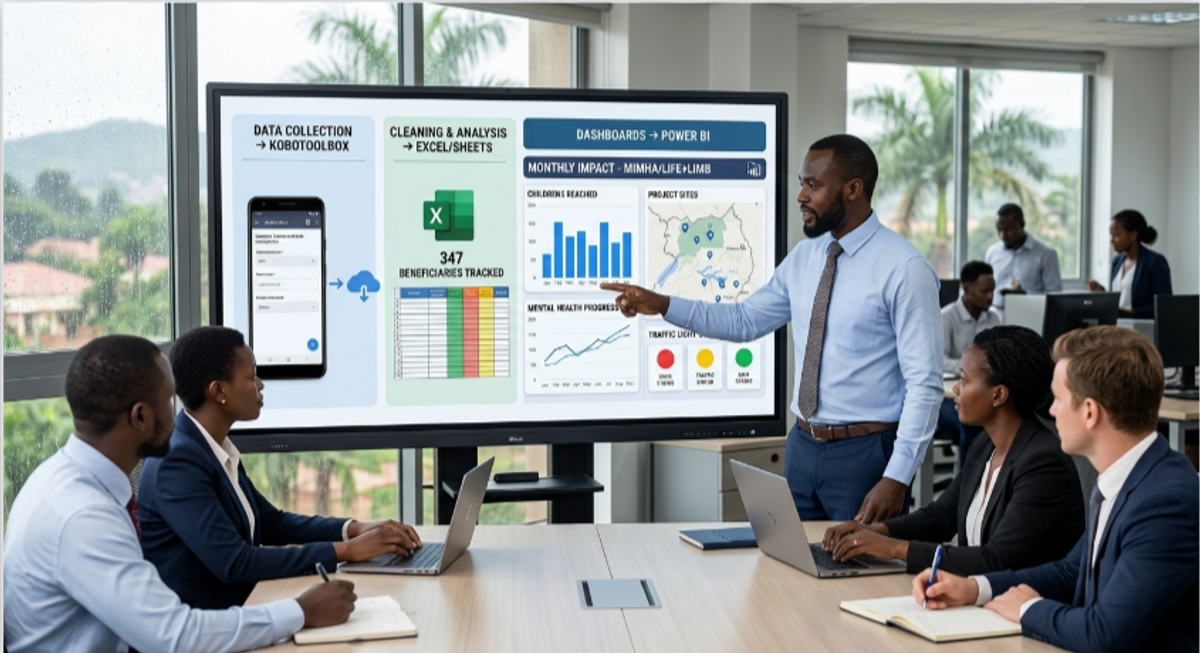
Is it possible to build a world-class Monitoring and Evaluation system in a rural setting with limited internet and a zero-shilling budget?
A few months ago, I sat with the director of a small CBO in Northern Uganda that was running a child nutrition program for over 200 families. When I asked how they tracked outcomes, she pulled out a thick notebook handwritten registers, some pages torn, others water-damaged. They had no way to show a donor whether the program was working. Not because the work wasn't happening, but because no one had helped them build a system to capture it.
That gap is common. Many small NGOs and CBOs in Uganda are doing serious work in mental health, child protection, climate resilience, livelihoods while operating with little or no budget for MEAL. At the same time, donor expectations around data-driven reporting have never been higher. The combination is painful: organizations doing important work that they cannot adequately prove.
The good news is that a credible, donor-ready MEAL system does not require expensive software or a large technical team. Drawing from my experience supporting programs at Laminopabo Child Development Center and MIMHA in Northern Uganda, here is a practical tools stack that works in resource-constrained settings including areas with unreliable internet and power.
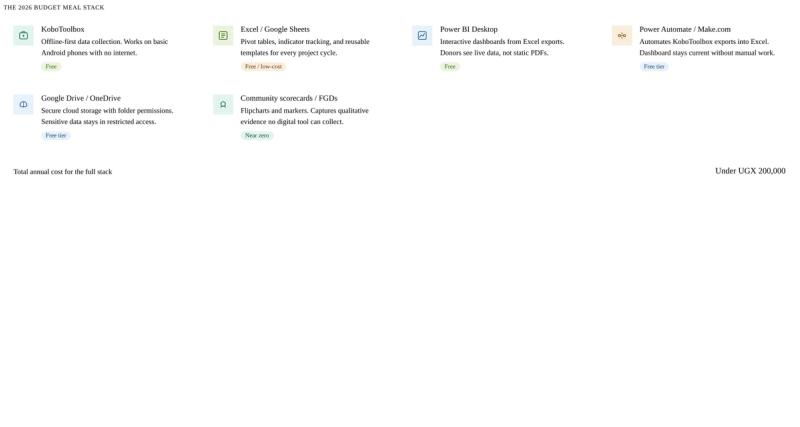
Start with data collection: KoboToolbox.
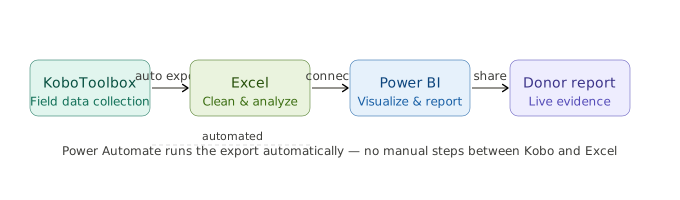
The foundation of any MEAL system is accurate field data, and KoboToolbox is the most practical free tool for collecting it in Ugandan contexts. Its offline-first design means enumerators can fill forms on basic Android smartphones without an active internet connection, then sync when they reach town. For field officers working in remote sub-counties, this is not a minor convenience it is what makes digital data collection possible at all.
Beyond connectivity, KoboToolbox supports GPS coordinates, photo attachments, skip logic, and multiple languages. In my work with mental health and trauma care programs, moving from paper forms to KoboToolbox reduced data entry errors significantly and made it possible to track beneficiary progress in near real-time.
One practical tip: keep your forms short and test them with actual enumerators before deploying. A form that works perfectly on a laptop can be frustrating on a small Android screen with someone who has limited smartphone experience. The field test always reveals something the office review missed. For practical tips of Form Design with KoboToolBox click https://www.ronaldobal.com/blog/kobotoolbox-forms-in-uganda-s-rural-contexts
Clean and analyze in Excel or Google Sheets if you have nothing else.
Excel is not glamorous, but it is installed on most organizational computers in Uganda, most staff already know it at a basic level, and it handles everything a small NGO needs for data analysis. Pivot tables, conditional formatting, and simple formulas can take a raw KoboToolbox export and turn it into a clean monthly indicator tracker in under an hour once you have a template set up.
The key word there is template. Creating standardized Excel templates that can be reused across project cycles saves significant time and reduces the risk of errors introduced by rebuilding sheets from scratch each reporting period. Build it once, protect the structure, and train your team to use it consistently.
For organizations that genuinely cannot access Excel, Google Sheets handles nearly all the same functions and works in a browser no installation required. LibreOffice Calc is a strong offline alternative that is completely free.
Visualize your data with Power BI Desktop.
A table of numbers in a report is easy to skip. A dashboard that lets a donor click on a district and see the trend in child attendance over six months is not.
Power BI Desktop is free to download and connects directly to Excel files or KoboToolbox exports. I use it for the programs I support at MIMHA and in the trauma care scale-up program managers can open one dashboard and immediately see which sites are performing well, which need attention, and how outcomes are trending over time. Donor report updates that used to take half a day now take twenty minutes.
The learning curve is real. Power BI is not as intuitive as Excel for beginners. But the investment of a few days learning the basics pays back quickly, and there is a large library of free tutorials on YouTube tailored specifically to NGO reporting use cases. Start with one simple dashboard three or four visuals, one data source before trying to build something comprehensive.
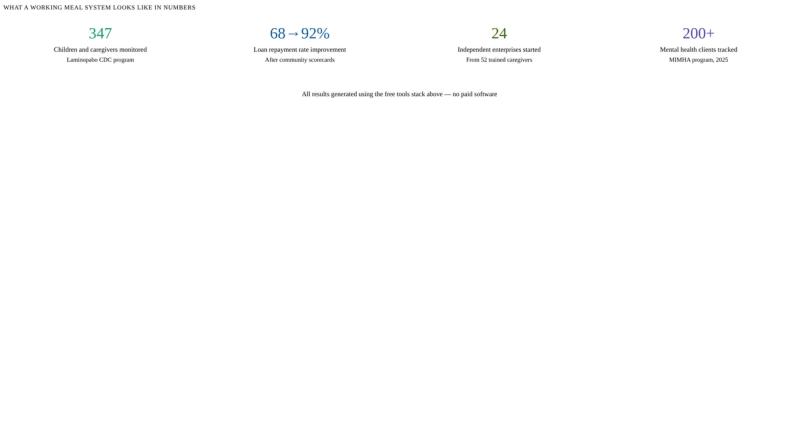
Don't let the digital tools crowd out community voice.
Numbers tell part of the story. They don't tell you why a program is working, or what it means to the people receiving it. In my experience, donors who fund community-based work in Uganda increasingly want both the quantitative evidence and the human context behind it.
Community Scorecards, Focus Group Discussions, and Most Significant Change stories cost almost nothing to run. A flipchart, some markers, a trained facilitator, and two hours with a community group can produce insights that months of household surveys miss. The discipline is in digitizing the findings summarizing key themes into your Kobo system or a structured Excel log so the qualitative evidence is searchable, organized, and available when you need it for a report.
This combination of participatory methods with digital tracking is what turns a basic MEAL system into a mixed-methods one. It is also what makes reports feel credible rather than mechanical.
Store data securely from the beginning.
For small organizations handling sensitive data mental health clients, GBV survivors, children data security is not a feature to add later. It needs to be built in from the start.
Google Drive and OneDrive both have free tiers with folder-level permissions that allow you to control exactly who can access what. Raw data with identifying information should sit in a restricted folder accessible only to the MEAL officer and program director. Anonymized datasets used for reporting can sit in a shared folder the full team accesses. The separation is simple to set up and matters enormously if there is ever a breach or a donor audit.
For the most sensitive data mental health case records, child protection case files I keep identifying information offline on an encrypted device, not on any cloud platform. The monitoring data (aggregated scores, attendance, outcomes) is what goes online. The distinction is worth being deliberate about.
The organizations I have seen struggle most with MEAL are not the ones that lack technical capacity. They are the ones that tried to build everything at once and got overwhelmed. The more useful approach is to start with KoboToolbox and Excel, get those working consistently, and add layers Power BI, automation, participatory methods as your team's confidence grows.
You only need a system that fits your context, that your team actually uses, and that produces evidence honest enough to learn from.
Ronald Obal
MEAL Manager & MEARL Specialist
Ronald Obal is a Monitoring, Evaluation, Accountability, Research and Learning professional focused on evidence systems for social impact programs in Uganda. With experience across mental health, child protection, education, and community development sectors.
Enjoyed this post? Follow for more.
Follow @real_obal